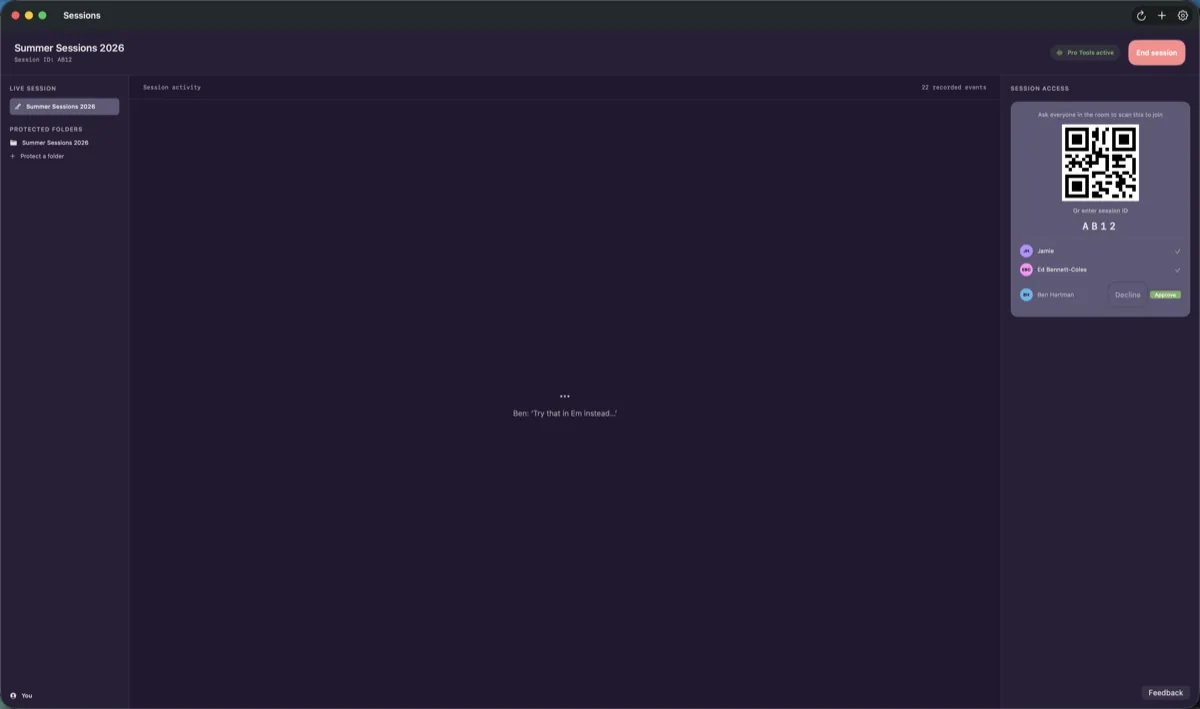
one session, two screens, one ceremony
Join. Attribute. Sign.
The Mac runs the room. The phone carries your identity. Every step below is a real screen from ARK Lab.
 01 · Join
The same session, in every pocket
Scan the QR on the Mac and your phone is in the room: same participants, same transcript, same session ID.
 02 · Attribute
Questions, while memory is fresh
ARK asks each participant what was theirs. Answers and corrections go into the record, timestamped when ARK received them.
 03 · Sign
The ceremony comes to you
A request raised on the Mac — by a person or by an agent — arrives on your phone. Face ID, or your voice. Nothing signs without you.
quiet by design
Your screen belongs to the DAW.
Musicians and producers don't want another window, and they don't want a new workflow. ARK Lab stays in the margins of the screen and records provenance you can verify — without asking you to do anything differently.
Nothing to open, nothing to arrange.
Protect a folder from Finder's right-click menu, then open your session as you always do. The project shows a badge in Finder; ARK Lab shows a menu bar item and a pet the size of a plug-in window. The main window is for reviewing evidence later, not for recording.
Provenance is written while you play.
Pro Tools tracks, takes and instrument metadata are attributed through its scripting layer as you record. Logic Pro and Pro Tools project folders are watched for changes. Instrument recognition and room diarization run on this Mac, and only if you turn them on.
You are interrupted for one thing only.
A claim that needs your name on it asks once — Touch ID, or a spoken one-time code — and takes seconds. Everything else is recorded with how it was known: declared by a person, read from the DAW, or inferred. Nothing is upgraded to your word without you.
- Menu bar
- one item: caught up, or action required
- Assistant
- 240 × 270 pt, floats where you put it
- Finder
- badges and a right-click menu
- Windows while recording
- none required
deep macOS integration
Built into the places you already work.
Not a dashboard you visit. ARK Lab sits inside Finder, Pro Tools, the menu bar and Siri, so attribution happens where the work happens.
Finder is the front door
Protect a folder from the right-click menu. ARK Lab is a Finder Sync extension: badges on protected projects, Quick Actions on files, and no separate app to hunt for.
Speaks Pro Tools natively
Through the Pro Tools scripting layer, tracks, takes and instrument metadata are attributed as you record — not reconstructed from a bounce afterwards.
Knows who is in the room
On-device speaker diarization tells the vocalist from the engineer and puts a name on each turn. The audio never leaves the host machine.
Room listening is off until you turn it on.
Hears what was played
Instrumental, a bundled on-device classifier, recognises the instrument on a take — and is always labelled as inferred, never confused with what a person declared.
A pet, not a panel
A cartoon companion the size of a plug-in window: push-to-talk, mute, and a diagram when a picture beats a paragraph. It runs on a model on your Mac and stops fidgeting during a live session.
Siri and Shortcuts
Ask what's pending, open a project, show the evidence. Siri can look and navigate. It cannot sign — nothing outside the ceremony can.
Share sheet, anywhere
Send a file into a protected project from any app that can share. It arrives with its provenance recorded.
Touch ID, Face ID, or your voice
Attestation is a ceremony on your own device — biometric only, no passcode fallback. Voice signing speaks a one-time code, so a recording can't be replayed.
your assistant, on your Mac
Talk to it. Nothing leaves the room.
The pet is a voice assistant that runs on a local model. You never need a ChatGPT or Claude account to use ARK Lab — those are optional ways to reach the same actions from somewhere else.
 Readywaiting, quietly
- Listeningpush-to-talk held
 Speakinganswering out loud
A model on your Mac, not a subscription
The assistant runs Gemma 4 locally — a 2.6 GB model installed through Apple-managed assets after your first unlock, with an opt-out in Settings › Private AI. Apple's on-device model is the fallback. No hosted AI service ever receives what you say to it.
Push to talk, mute to be left alone
Hold to speak, let go to be understood. Mute is one click and the pet shows it. It stops fidgeting during a live session, and it can draw a diagram when a picture beats a paragraph.
Every action in the app is a tool
Anything you can do in five clicks, you can ask for: what's pending, open a project, show the evidence, start a session. The pet, Siri and any connected agent share one catalog, so nothing is available to a cloud agent that isn't available to you here.
Works with the studio offline
The assistant, transcription and instrument recognition need no internet connection. Audio and transcripts stay on this machine. Signing stays a ceremony on your own device.
Prefer Claude or ChatGPT? They're welcome, and optional. They connect from outside to the same catalog with the same limits: read, start, never sign. See how agents are held to that.
bring your own agent · optional
Your agent can run the whole workflow. It can never hold the pen.
Prefer Claude or ChatGPT? They connect over MCP to the same actions the app exposes. Every action carries an authority level, and the server enforces it. None of this is required to use ARK Lab.
Read
readObserve and report. Projects, sessions, evidence, what's pending — with every answer citing the receipt it came from.
Initiate
initiateCreate work a person still has to finish. Start a session, file a correction, raise an attestation request.
Never authorize
never authorizeThere is deliberately no level above initiate. No agent completes a ceremony, however the request is phrased. Attestation happens on your device, with your biometrics.
Everything an agent does is recorded as agent-initiated, so an assistant's action is never mistaken for yours in the evidence.
ark.projects.searchreadFind your projects.ark.sessions.listreadRecent studio sessions.ark.sessions.getreadOne session, with participants and state.ark.evidence.getreadRead a recorded proof.ark.evidence.searchreadWho played what, on which track, when.ark.people.resolvereadTurn a name into a person — and ask when it's ambiguous.ark.requests.pendingreadWhat is waiting for you. Accepts nothing.ark.attestation.resultreadWhether you completed a ceremony.ark.sessions.startinitiateOpen a session. Capture stays on the device.session_claims.submit_correctioninitiateAppend a correction to the record.session_claims.raise_promptinitiateAsk everyone in a live session a question.ark.attestation.requestinitiateRaise a signing request for you to approve.ark.app.installreadHow to install, and what an agent may not do.
connect in two minutes
Bring ARK to wherever you already talk to your agent.
Start with where you are. In a browser, ARK answers questions and raises requests. On your Mac, your agent can drive ARK Lab itself. Developers install it as a plugin.
No install. Works at claude.ai and chatgpt.com, and in the Claude and ChatGPT apps on any device. Your agent can read your projects, sessions and evidence, and raise requests for you to approve — it cannot control the Mac app from here.
Claude
- 1Open Settings → Connectors and choose Add custom connector.
- 2Paste the ARK server URL:url
https://arkmcp.showntell.dev/mcp - 3Click Add, then Connect, and sign in with your ARK account.
- 4Ask: “What’s pending for me in ARK?”
ChatGPT
- 1Open Settings → Connectors. Under Advanced, turn on Developer mode.
- 2Choose Create and paste the ARK server URL:url
https://arkmcp.showntell.dev/mcp - 3Sign in with your ARK account when prompted. There is no key to copy.
- 4In a new chat, enable the ARK connector and ask: “Which tracks did Jaime play piano on last year?”
evidence that leaves the room intact
Provenance you can hand to someone who doesn’t trust you.
A screenshot proves nothing. ARK builds a chain a lawyer, a label or a collaborator can check without taking anyone’s word for it.
- project
- Blue Room — Night Drive
- session
- 2026-09-04 · 20:14–23:02 CEST
- participants
- Jaime R. (piano) · Edward B-C. (vocals) · Johan S. (engineer)
- takes
- 14 attributed · 2 corrections · 0 disputed
- receipt.sha256
- 9f2c…a41e
- merkle.root
- c0de…77b3
- tsa.timestamp
- RFC 3161 · 2026-09-04T21:02:11Z
- anchor
- on-chain · IPFS mirror
Attested by Johan S. on this Mac
Touch ID ceremony · agent-initiated request, human-completed
This is what a session leaves behind.
Not a PDF someone typed up afterwards — a receipt. Who was there and what they played, the takes and the corrections, a digest of the exact bytes, an independent timestamp, an anchor outside ARK, and the signature that closed it. Every field can be checked by someone who has never heard of ARK.
Below: the layers that make that receipt worth something.
Append-only log, Merkle receipts
Every event is appended, never edited. Batches are Merkle-rooted, and each receipt carries the path back to its root, so a single record can be verified on its own.
Independent timestamps
Receipts are timestamped by an RFC 3161 authority, so “when” does not rest on ARK’s clock — or ARK’s word.
Anchored beyond the server
Roots are anchored on-chain and mirrored to IPFS. If ARK vanished tomorrow, the evidence would still verify.
C2PA at the export boundary
Evidence bundles and final masters carry Content Credentials. Verification fails closed: if the sidecar and the bundle disagree, nothing is called valid.
Claims, not assertions
Attribution is recorded as what it is — declared by a participant, read from the DAW, or inferred by a model — with its status: claimed, confirmed, disputed, or consent withheld. Never flattened.
Machine-checked protocols
Selected critical protocols — signing, session claims, OAuth, the evidence core — are modelled in Lean 4 and Tamarin and re-proved in CI on every change. Not a claim that the whole product is formally verified; a claim that the parts that matter most are checked by machine.
get the app
Download ARK Lab for Mac.
A notarised disk image. Open it, drag ARK Lab to Applications, sign in. No installer, no admin password.

ARK Lab
macOS 14 or later · Apple silicon · beta
Lab is the early-access build. It signs in with your ARK account and shares your backend, keys and voice profile with the regular app, so nothing you record here is a throwaway.
Approvals in your pocket
The iPhone and Android companions carry the attestation ceremony with you. When an agent raises a request on the Mac, it lands on your phone — Face ID or voice, your choice — and the receipt records which.